
Accessibility checker
Website accessibility checker that shows you what to fix
This website accessibility checker runs the automated tests for WCAG 2.1 level A and AA, plus the WCAG 2.2 test for target size, the guidelines behind the European Accessibility Act and most accessibility guidance. Every problem is explained in plain words: where it is, why it matters and what to change.
Try it free with no card, or choose a plan and pay straight away. Read the full guide
Accessibility rules now reach small online shops
Since 28 June 2025 the European Accessibility Act covers online shops and other digital services sold to consumers in the EU, including sellers based outside the EU. In the US, website accessibility claims under the Americans with Disabilities Act are common, and small businesses receive them too. In the UK, the Equality Act 2010 requires businesses to make reasonable adjustments for disabled customers, and in Australia the Disability Discrimination Act 1992 applies to goods and services offered online. This is general information, not legal advice.
Most problems are small and fixable: product photos without a description, pale grey text, form fields without a label, icon buttons with no name. The hard part is finding them on every page and knowing what to change. A full audit by a specialist is worth doing for important journeys, but it is a lot to pay for problems you could have found and fixed yourself first.
The checker does that groundwork. It visits your pages like a visitor, runs the automated WCAG tests, and turns the results into a fix list you or your web developer can work through. It is honest about its limits: automated checks find a part of the problems, and some things always need a person to judge.
How it works
Check one page for free
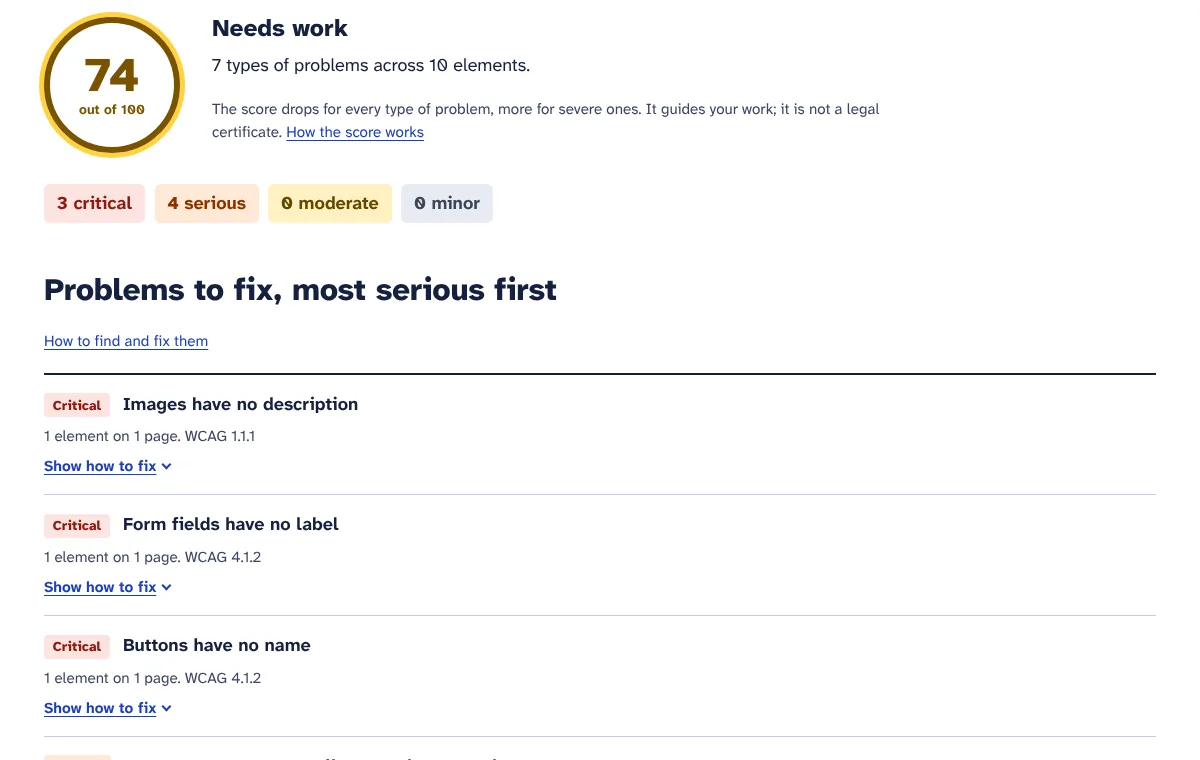
Type any address on our home page. The checker tests that one page, usually in under a minute, and shows a score, the number of problems by severity and the top three problems. No account needed.
Add your website
Start the free trial and add your address. The checker opens your start page, follows the links to other pages on your site and checks up to your plan’s pages per check: 10 in the trial, 50 on Starter and 200 on Pro.
Work through the fix list
Problems are grouped by type and sorted from critical to minor. Each one shows the pages and elements where it happens, the WCAG success criterion it breaks and what to change, in plain words.
Share the report and publish your statement
Download the report as a PDF for your web developer or your records. Create an accessibility statement that starts from your latest check, then copy the HTML into a page on your site.
Keep checking automatically
On a paid plan, switch on automatic re-checks: weekly on Starter, daily on Pro. You get an email when new problems appear, the score drops or a check fails, with a link to the report.
What you get
Automated WCAG 2.1 A and AA tests, plus WCAG 2.2
Each page is opened in a real Chrome browser and tested with axe-core 4.14, the open-source engine behind many accessibility tools: its rules for WCAG 2.0 and 2.1 at levels A and AA, plus the one WCAG 2.2 criterion it can test automatically, target size. That is more than 60 automated rules.
Checks your whole site, not just one page
Starting from your address, the checker follows links on the same domain (with or without www), nearest pages first. It skips files such as PDFs and images, ignores tracking parameters and never checks the same address twice in one run.
A score you can track
Every check gets a score out of 100, rated Good, Needs work or Poor. Each type of problem on a page lowers that page’s score, severe ones more. The score shows your progress; it is not a legal certificate.
Most serious problems first
Problems are sorted by impact: critical, serious, moderate and minor, and then by how many elements they affect. Start at the top and you fix what blocks people most.
Where, why and how to fix
For each problem you see up to six examples with the page address, the element’s location and its HTML code, a plain-language fix for the problems small-business sites hit most, and a link to the technical background.
WCAG criteria on every problem
Each problem lists the WCAG success criteria it fails, such as 1.1.1 for images or 1.4.3 for contrast, so you and your developer can look them up and match them to an audit or to EN 301 549.
PDF report
Download any finished check as an A4 PDF with every problem opened up. Send it to your developer, share it with a client or keep it as a dated record of your work.
Accessibility statement generator
A form fills in your business name, website, contact email and the known problems from your latest check. You choose the standard (WCAG 2.1 or 2.2 level AA), the conformance status, how you assessed the site and how soon you reply, then copy ready-made HTML. Refill it from a newer check at any time.
Automatic re-checks with email alerts (paid plans)
Switch on automatic re-checks per website: weekly on Starter, daily on Pro, on a fixed schedule. You only get an email when new types of problems appear, the score drops or a check fails, so quiet weeks stay quiet.
Check history
Every check is kept with its date, score, number of pages and whether you started it or it ran automatically, so you can see your progress and open any earlier report.
Nothing to install
The checker visits your public pages the way a visitor does. There is no code to add and nothing changes on your site, so it works with WordPress, WooCommerce, Shopify, Wix, Squarespace or a site built by hand.
Gentle on your website
Pages are opened one after another, not all at once. The checker does not fill in forms, click buttons or put anything in a basket, and it does not download video or audio.
Who it is for
Online shops selling to EU consumers
Find the problems on home, category and product pages, fix product photos, contrast and form labels, and publish the accessibility information the EAA asks for. This also applies to UK, US and Australian shops that sell into the EU.
Service businesses with online booking
Salons, clinics, studios and tradespeople check that their booking and contact forms have labels, their buttons have names and their text is readable on every page.
US businesses worried about ADA claims
Find and fix the common barriers named in Department of Justice guidance, such as missing alt text and poor contrast, and keep dated reports that show your ongoing work.
Web designers and small agencies
On Pro, check up to five client websites, hand over a PDF report after a redesign and get an email when a daily re-check finds that an update has made a site worse.
Plans and prices
-
Free trial
€0 for 7 days
- 1 website
- 25 pages checked in total
- Up to 10 pages per check
- Full fix list for every problem
- PDF reports and accessibility statement
-
Starter
€29 per month
- 1 website
- 500 pages checked per month
- Up to 50 pages per check
- Weekly automatic re-checks with email alerts
- PDF reports and accessibility statement
-
Pro
€59 per month
- 5 websites
- 3,000 pages checked per month
- Up to 200 pages per check
- Daily automatic re-checks with email alerts
- PDF reports and accessibility statement
Prices exclude VAT or sales tax, which is added at checkout for your country. Plans pay for the tools themselves. Where a tool uses your own AI, Twilio, WhatsApp or email account, that provider bills you directly. Cancel any time.
Questions
Does a good score mean my website complies with the EAA or the ADA?
No. A high score means the automated tests found few problems on the pages checked. Automated tests cannot judge everything WCAG asks for, such as whether image descriptions make sense or whether the checkout works with a keyboard. Use the report to fix what can be found automatically, then review the rest by hand. We do not give legal advice or certificates.
How much of WCAG can an automated checker test?
Only part of it. Some success criteria can be tested fully in code, such as missing labels or contrast; many need a person to judge. Our checker reports only clear failures and leaves out items it cannot decide, so it does not flood you with guesses. The guide lists what to test by hand.
Which pages does it check?
It starts at the address you add, usually your home page, and follows links to other pages on the same domain, nearest pages first, up to your plan’s limit per check. It does not log in, fill in forms or add products to a basket, so account pages and checkout steps after the basket are not checked automatically.
Will the checker slow down or change my website?
No. It opens your public pages one at a time, much like a single visitor browsing, and it does not submit forms, click buttons or buy anything. Video and audio files are not downloaded. Nothing is installed on your site and nothing on it changes.
What counts as a page in my plan?
Every page that is checked successfully counts as one page. Pages that could not be opened do not count. The limit per check is a maximum: if your site has 30 pages and your plan allows 50 per check, the check uses 30. Paid plans get a new allowance each calendar month.
Is the accessibility statement enough for the EAA?
It is a good start, not a finished legal document. The EAA asks service providers to explain how their service meets the accessibility requirements, in an accessible way and in their terms and conditions or an equivalent document. Our generator writes the statement part from your latest check; check it, add a description of your service and how it works, and link it from your terms.
Does it test WCAG 2.2?
Partly. WCAG 2.2 added nine success criteria. The automated rules can test one of them, target size (2.5.8), and the report says exactly that. The others, such as focus not obscured and accessible authentication, need a manual check. All automated WCAG 2.1 level A and AA rules are included.
Can I check websites I do not own?
Only check websites you are allowed to test, such as your own or a client’s with their permission. The Pro plan covers up to five websites, which suits small agencies and businesses with several shops. Each website has its own reports, statement and automatic re-checks.
What happens when my free trial ends?
Your websites, reports, PDFs and statements stay available. To run new checks or add websites, choose a plan under Plan and billing. You can switch between Starter and Pro or cancel any time; payments and invoices are handled by Paddle, our reseller.
More answers in the Accessibility checker guide.
Try Accessibility checker free for 7 days
Every tool is included in the trial. No card needed, cancel any time.