
E-invoices
E-invoice generator for XRechnung, ZUGFeRD and Peppol
Fill in one plain invoice form. The e-invoice generator checks it against the European e-invoicing rules, tells you in plain words what is missing, and turns it into the file your customer, their accounting software or your Peppol provider expects.
Try it free with no card, or choose a plan and pay straight away. Read the full guide
A PDF invoice is no longer enough for many business customers
Invoices between businesses in Europe are moving to structured e-invoices: files that accounting software reads without anyone typing. In Germany every business has had to be able to receive them since January 2025, and issuing them becomes mandatory in 2027 and 2028. In France all businesses must be able to receive e-invoices through approved platforms from September 2026. Belgium has required Peppol e-invoices between Belgian VAT-registered businesses since January 2026.
The formats are strict. A missing postcode, a VAT ID without its country code or a reverse charge invoice without the customer’s VAT ID is enough for the receiving software to reject the file. Large accounting suites handle this, but they are often more than a small business needs to send a few invoices a month.
This tool does one job well: it turns your invoice into a valid e-invoice and tells you what to fix before you issue it. For the rules in each country, with sources, read our pages on XRechnung in Germany, Factur-X in France and Peppol e-invoicing. They are general information, not legal advice.
How it works
Add your business details once
Your legal name, address, VAT ID or tax number, contact person and bank details go into Your invoice details. They are copied into every invoice, so you never type them again.
Add the customer and the lines
Pick a saved customer or type a new one. Add one line per item with quantity, unit, price without VAT and a VAT type: standard rate, zero-rated, exempt, reverse charge, intra-EU supply, export or not subject to VAT.
Check, then issue
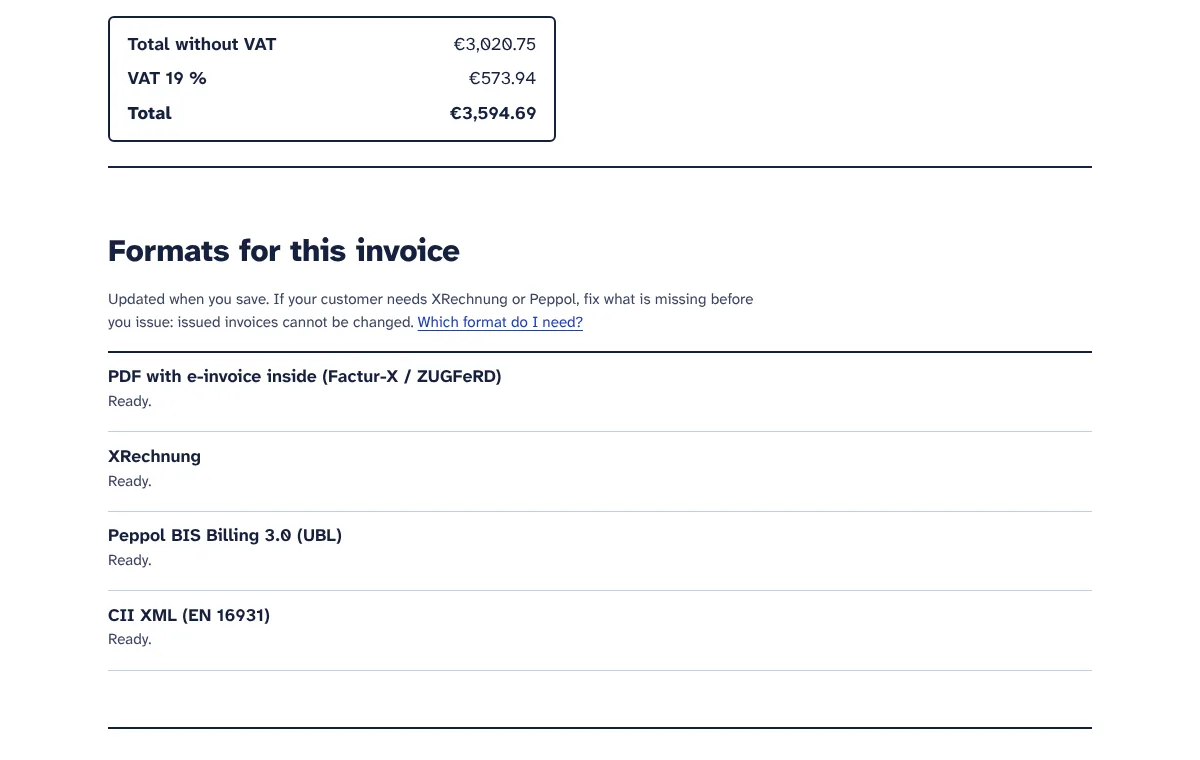
While it is still a draft, the invoice shows which formats are ready and what each one still needs. One click checks it against the EN 16931 rules; anything missing comes as a short list of fixes that link to the right field. When it passes, the invoice is issued and locked, as tax rules expect.
Download the format your customer needs
Every issued invoice comes as a Factur-X / ZUGFeRD PDF and as CII XML. XRechnung and Peppol BIS Billing 3.0 files are offered as soon as the extra details those formats need are present.
Send it or hand it on
Email the PDF from your own mailbox, with the XRechnung or Peppol file attached if you like. For Peppol or France’s approved platforms, upload the downloaded file to your access point, accounting software or platform.
What you get
Four formats from one invoice
PDF with the e-invoice inside (Factur-X / ZUGFeRD, EN 16931 profile), XRechnung 3.0 in UBL, Peppol BIS Billing 3.0 in UBL, and CII XML. You type the invoice once and download whichever file each customer needs.
Checks that follow the official rules
The checks are built from the EN 16931 business rules and the extra rules of XRechnung and Peppol. During development, sample invoices for every VAT type were run through the official validators for EN 16931, Peppol BIS Billing 3.0 and XRechnung, and the tool’s verdict matched theirs.
Format check before you issue
Each draft shows which formats are ready and what the others still need, for example the customer’s Peppol ID or a contact phone number for XRechnung. Messages are plain sentences that link to the field to fix, even when it is on your business details page.
Credit notes that reference the invoice
Start a credit note from any issued invoice in one click. It refers to the original invoice, carries positive amounts as the standard expects, can credit all or part of it, and comes in the same four formats and eight languages.
A PDF/A-3 with the data inside
The PDF is built as PDF/A-3 with embedded fonts and the invoice data attached as factur-x.xml. People read it like any invoice, and accounting software reads the data. Add your logo as PNG or JPEG.
Eight languages
The PDF and the covering email come in English, German, French, Spanish, Italian, Dutch, Polish or Portuguese, with dates, amounts, units and country names in that language. Set a language per customer.
Exact amounts and several VAT rates
Amounts are calculated with exact decimals and rounded to the cent the way the standard expects, so totals in the file always add up. One invoice can mix VAT rates. Decimal commas and decimal points are both understood.
VAT types for cross-border sales
Seven VAT types with the codes EN 16931 requires: reverse charge, intra-EU supply, export, exempt, zero-rated and not subject to VAT. Exemption reasons are written in the invoice’s language, and you can add your own legal reference, such as Article 138 of the VAT Directive.
Peppol IDs and country details
Choose from the official Peppol address types, such as Belgian enterprise number, Dutch KvK number, German VAT number or Finnish OVT code. Dutch Peppol rules are checked, and French invoices can carry the SIRENs, delivery address, type of supply and VAT-on-debits option the reform asks for.
Email from your own address
Connect your mailbox once. Invoices go out from your address with the PDF and, if you choose, the XRechnung or Peppol file attached. Replies come to you, and the invoice list shows when and to whom each one was emailed.
Saved customers and numbering
Customers are saved when you issue. Invoice numbers count up on their own, for example 2026-0001 then 2026-0002, and a number can never be used twice. Copy any invoice into a new draft for repeat work.
Bulk drafts from a CSV file
On the Pro plan, upload a CSV with one row per invoice line. Rows with the same invoice number become one invoice. A preview shows problems first, and one button issues every draft that passes the checks.
Who it is for
Freelancers and agencies in Germany
Send ZUGFeRD PDFs or XRechnung files to German business customers ahead of the 2027 and 2028 deadlines, and XRechnung with the Leitweg-ID to public bodies.
Small businesses in Belgium
Create Peppol BIS Billing 3.0 files for Belgian business customers and upload them to the Peppol access point or accounting software you already use.
Suppliers to French companies
Give French customers a Factur-X PDF that people can read and software can import, with the SIRENs, delivery address and type of supply the reform asks for. Once the reform applies to you, upload it to your approved platform.
Businesses in the UK, USA or Australia with EU customers
When an EU customer or public body asks for an e-invoice, create an EN 16931 file in the format they want without buying an EU accounting package. Export and not-subject-to-VAT invoices are covered.
Wholesalers and shops with many business orders
Export your orders as a CSV file, create drafts in bulk, check them and issue all that pass in one go.
Plans and prices
-
Free trial
€0 for 7 days
- Issue up to 5 e-invoices
- All four formats: Factur-X / ZUGFeRD PDF, XRechnung, Peppol UBL and CII XML
- The full checks with plain-language messages
- Email invoices from your own mailbox
- Create drafts in bulk from a CSV file
- Unlimited drafts and saved customers
-
Starter
€19 per month
- 50 e-invoices per month
- Peppol UBL, XRechnung and Factur-X
- Checks against EN 16931 rules
- PDF copy and email from your own address
-
Pro
€34 per month
- 500 e-invoices per month
- Peppol UBL, XRechnung and Factur-X
- Checks against EN 16931 rules
- PDF copy and email from your own address
- Create invoices in bulk from a CSV file
Prices exclude VAT or sales tax, which is added at checkout for your country. Plans pay for the tools themselves. Where a tool uses your own AI, Twilio, WhatsApp or email account, that provider bills you directly. Cancel any time.
Questions
Does the tool send invoices through Peppol?
No. It creates a valid Peppol BIS Billing 3.0 file, but it is not a Peppol access point and does not connect to the Peppol network. To send through Peppol, for example to a Belgian business customer, upload the downloaded file to your Peppol access point or to accounting software that is connected to Peppol. The tool can email files from your own mailbox, which is an accepted route in Germany, for example.
Does it connect to French approved platforms?
No. Once the French reform applies to you, invoices to French business customers must go through your plateforme agréée. You create the Factur-X PDF here, with SIRENs, delivery address, type of supply and the VAT-on-debits option, plus the coded legal notes on penalties, the €40 recovery fee and discounts, and upload it to your platform. A sample from the tool passed the official French validation rules.
Which format should I choose?
For German business customers, the ZUGFeRD PDF, or XRechnung if they ask for it. For German public bodies, XRechnung with the Leitweg-ID. For French customers, the Factur-X PDF. For customers who receive through Peppol, such as businesses in Belgium, the Netherlands or the Nordic countries, the Peppol file. For accounting software that imports CII, the CII file. When in doubt, ask the customer’s accounts team.
Will the files pass the customer’s validation?
The checks follow the official EN 16931, XRechnung and Peppol rules, and during development sample invoices were run through the official validators with matching results. A format is only offered when its checks pass. The tool cannot know whether the data you type is true, though: it checks that a VAT ID starts with the right country code, not that it is registered. You can check that in the EU’s VIES service.
Can I change an invoice after issuing it?
No. Issued invoices are locked, because tax rules expect you to keep them unchanged. To correct one, choose Create a credit note on the invoice: the credit note refers to the original, credits all or part of it, and is checked like an invoice. Then issue a corrected invoice, for example with Copy into a new draft. Your accountant can tell you which correction your country expects.
Can I use it if my business is outside the EU?
Yes, for invoices to customers who want EN 16931 e-invoices, for example from the UK, USA or Australia to German, French or Belgian customers. You can invoice in currencies such as GBP, USD or AUD and use the export or not-subject-to-VAT types. Note that Australia and New Zealand use their own Peppol invoice specification, which this tool does not create.
What do I need before I start?
Your legal name and address, your VAT ID or tax number, a company registration number if you have one, a contact name, phone and email, and your bank details. For each customer you need their name, address, country and, for cross-border sales, their VAT ID. For Peppol you need your own Peppol ID and your customer’s, which your Peppol provider and your customer can give you.
Can I import invoices from my shop or accounting software?
There is no direct connection to shops or accounting software. On the Pro plan, and in the free trial, you can upload a CSV file with one row per invoice line. The tool creates drafts from it, shows problems before you confirm, and can issue every draft that passes the checks in one go. Start from the example file the tool gives you.
What happens when my free trial ends?
Your drafts, issued invoices, credit notes and customers stay in your account, and you can still open and download what you already issued. To issue new documents you choose a plan for e-invoices. Plans differ in how many invoices and credit notes you can issue each month and whether CSV import is included; drafts, downloads and emails are never counted.
More answers in the E-invoices guide.
Try E-invoices free for 7 days
Every tool is included in the trial. No card needed, cancel any time.