
Subscription tracker
Subscription tracker that finds every recurring payment
Download your transactions from online banking and upload the file. The subscription tracker finds the payments that repeat every week, month, quarter or year, adds up what they cost, and emails you before each one renews, so you can cancel what you no longer use in time.
Try it free with no card, or choose a plan and pay straight away. Read the full guide
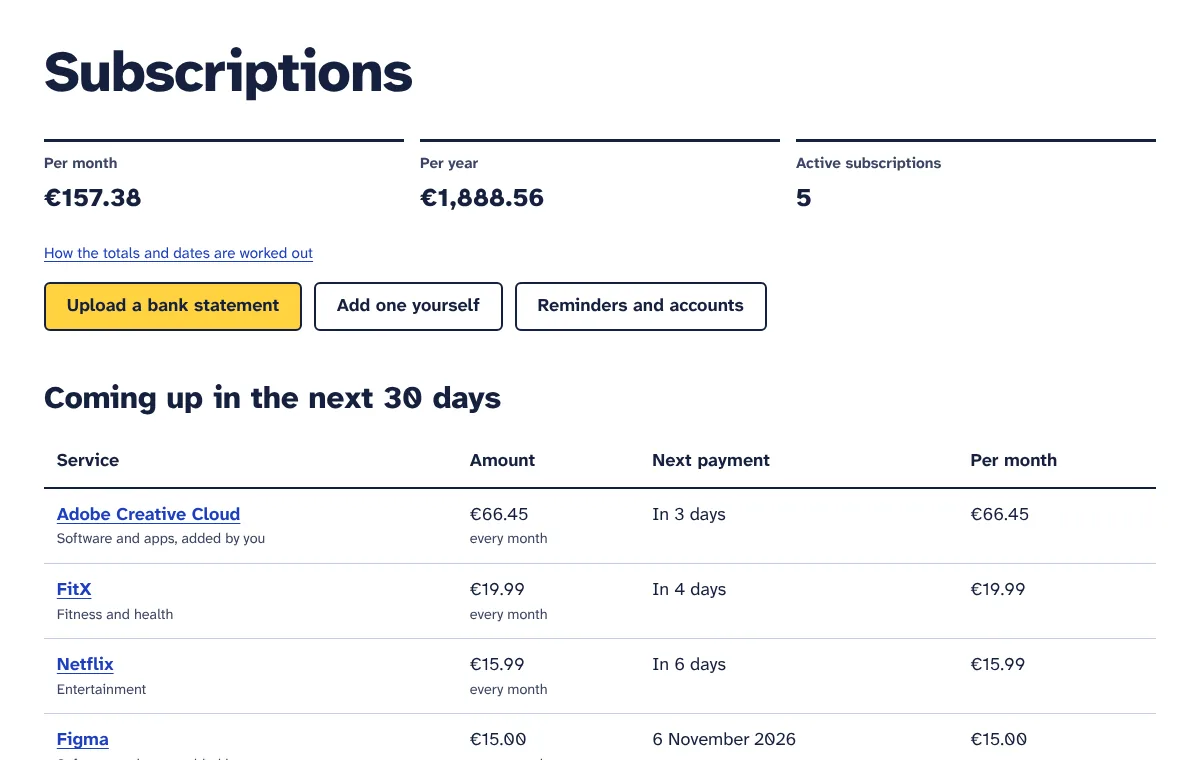
Small subscriptions add up, and renewals arrive without warning
Software, SaaS tools, hosting, phone contracts, apps and memberships are signed up for one at a time, often by different people and on different cards. Each one looks small on its own. Nobody has the full list, so nobody knows what the business really pays for them each month.
Then a yearly plan renews for a tool no one has opened since spring, or a free trial quietly turns into a paid plan. By the time it shows up on the statement, the money is gone and the next chance to cancel is a year away.
You could go through months of statements line by line in a spreadsheet. The subscription tracker does that part for you, and then keeps an eye on the renewal dates.
How it works
Download your transactions
In your online banking, export the transactions of your business account or card as a CSV, CAMT.053 (XML) or OFX/QFX file. Three months finds most monthly payments; 13 months also catches yearly renewals. PDF statements cannot be read.
Upload the file
Say which account or card it comes from and upload it. The tracker keeps only the payments out of the account: income and balances are left out as the file is read. Payments already uploaded from an overlapping file are skipped.
See what repeats
Payments are grouped by supplier, well-known services get their proper name and a category, and steady weekly, monthly, quarterly and yearly rhythms are found. You see monthly and yearly totals, what is due in the next 30 days, and what seems to have stopped.
Check and tidy the list
Confirm services seen only once, mark what you have cancelled or what is not a subscription, correct names or amounts, and add anything missing by hand, such as a free trial you just started.
Get an email before you pay
Choose how many days before a renewal or the end of a free trial you want a reminder, from 1 to 14. That gives you time to cancel with the provider before the next charge.
What you get
Reads the files banks really export
CSV in many layouts and languages, including files with account details above the header row, semicolons, decimal commas and day-first or month-first dates. Also CAMT.053 XML (and CAMT.052 and .054) and OFX/QFX. Files up to 5 MB.
Recognises about 80 well-known services
Microsoft 365, Google Workspace, Adobe, Slack, Zoom, Shopify, Xero, QuickBooks, Dropbox, hosting providers, phone companies and more get a clean name and a category. Other suppliers get a tidy name from the payment text, without reference numbers or prefixes such as PayPal or Stripe.
Finds weekly, monthly, quarterly and yearly payments
A subscription is the same supplier, a similar amount and a steady rhythm. Price rises of up to about a quarter still count as the same subscription, one missed or doubled charge is allowed, and two plans from one supplier at different prices are kept apart.
Totals and what is coming up
See what your active subscriptions cost per month and per year, each currency on its own line with no guessed exchange rates. The list is sorted by next payment, with everything due in the next 30 days first.
“Check these” for payments seen once
A well-known service paid only once in your file goes to a short list. One click says whether it is charged every week, every month, every 3 months or every year, or is not a subscription at all.
Spots payments that probably stopped
When a payment did not arrive when the next one was due, it moves to “Probably stopped” and out of your totals. Upload a newer statement and it is checked again.
Warns if a cancelled subscription charges again
Mark a subscription as cancelled once you have cancelled it with the provider. If a later statement shows another charge from it, it comes back to your active list with a warning to check that the cancellation went through.
Free trials and subscriptions added by hand
Add subscriptions that are not in a statement yet. Give a free trial its end date and the price after it: it is not counted in your totals until it charges, and you get an email before it turns into a paid plan. When it shows up in a statement later, the two become one.
Renewal reminder emails
One email lists everything that renews soon. Choose 1, 2, 3, 5, 7 or 14 days ahead and your time zone, and switch reminders off for single subscriptions or altogether.
Several accounts and cards
Name each source, such as “Business account” or “Company credit card”, and upload statements to each one. Each account remembers its currency. Starter covers one account or card; Pro covers up to 10, all in one list with combined totals.
Export to CSV (Pro)
Download the whole list with name, category, status, amount, currency, how often, cost per month, next payment and last paid date, ready for a spreadsheet, your budget or your accountant.
Only payments out are kept
Money coming in, balances and the file itself are not stored, and there is no connection to your bank. Delete one account’s payments, or all statement data, whenever you like.
Who it is for
Agencies and studios
Design, development and collaboration tools are often paid per person. See every tool in one list with its monthly cost, and catch the ones left over from past projects or from people who have moved on.
Online shops
Shop platform, email marketing, hosting and domains are spread over cards and accounts, and several of them renew once a year. Upload each statement and get an email before the big yearly renewals.
Freelancers and sole traders
Software, phone, cloud storage and memberships come out of one account. Know your monthly cost, keep track of free trials you started for a client job, and cancel them before they turn paid.
Salons, clinics and small offices
Booking software, phone and internet, insurance and card terminal fees are paid by direct debit and easy to forget. See what goes out every month and quarter, and switch on reminders for the ones you want to review.
Plans and prices
-
Free trial
€0 for 7 days
- 3 statement uploads
- 1 bank account or card
- Weekly, monthly, quarterly and yearly payments found
- Monthly and yearly totals
- Renewal and free trial reminder emails
- Add subscriptions by hand
-
Starter
€15 per month
- 1 bank account or card
- 10 statement uploads per month
- Email reminders before renewals
- Monthly and yearly cost overview
-
Pro
€22 per month
- Up to 10 bank accounts or cards
- 60 statement uploads per month
- Email reminders before renewals
- Monthly and yearly cost overview
- Export to CSV
Prices exclude VAT or sales tax, which is added at checkout for your country. Plans pay for the tools themselves. Where a tool uses your own AI, Twilio, WhatsApp or email account, that provider bills you directly. Cancel any time.
Questions
Do you connect to my bank account?
No. There is no bank login and no open-banking connection. You download a file from your online banking and upload it yourself. We never see your banking password, but it also means the list does not update on its own. Upload a newer statement when you want to bring it up to date, for example once a month.
Which banks and file formats work?
Any bank or card provider that lets you download transactions as CSV, CAMT.053 (XML) or OFX/QFX. Most online banking offers at least CSV, usually under Transactions, Statements or Export. The tracker finds the date, amount and payee columns itself, in English and several other European languages. PDF, Excel and MT940 files cannot be read, so choose one of the supported formats.
Will it find every subscription?
It finds payments that repeat at a steady rhythm with a similar amount. A well-known service needs two payments, other suppliers three, and a yearly payment two that are about a year apart. Bills that change a lot from month to month, payments from cards you did not upload, and services billed through another platform can be missed. Add those by hand so they are in your totals and reminders.
Can it cancel subscriptions for me?
No. Cancelling happens with the provider, usually in the billing settings of your account with them. The tracker shows what you pay, reminds you a few days before each renewal or free trial end, and keeps a list of what you have cancelled. If a later statement shows that a cancelled subscription charged again, it comes back to your active list with a warning.
How do free trials work?
A free trial does not show in a statement until it charges, so add it with Add one yourself. Enter the price you will pay after the trial, how often it is charged, the date of the first payment and the date the free trial ends. You get an email before the trial ends, and it is not counted in your totals until then.
We pay in several currencies. How are totals shown?
Each currency gets its own monthly and yearly total, with no exchange rates guessed. OFX/QFX and CAMT.053 files include the currency, and so do CSV files with a currency column. Many CSV exports have none, so when you upload you choose the currency of the account, such as US dollars, pounds or Australian dollars. Each account remembers its currency for the next upload.
What data do you keep from my statement?
Only the payments out of the account: date, amount, currency, payee name and payment text. Money coming in and your balance are dropped while the file is read, and the file itself is not stored. You can delete one account’s payments, or all statement data, under Reminders and accounts at any time. Subscriptions you added yourself stay until you delete them.
How often should I upload, and what about overlapping files?
Once a month is enough for most businesses. Overlapping files are fine: payments already uploaded for the same account are skipped, so you can download “the last three months” each time without creating duplicates. Each upload counts towards your plan: 3 in the free trial, 10 a month on Starter and 60 a month on Pro.
Can I track more than one bank account or card?
Yes, on Pro. The free trial and Starter include one account or card; Pro includes up to 10. You name each one when you upload its first statement, and all of them feed one list with combined totals. If the same payments end up in two accounts by mistake, they are only counted once.
What happens when the free trial ends?
Choose a plan to keep uploading statements and getting reminder emails. If you do not, your subscriptions, accounts and settings stay where they are and you can still open your list, but new uploads and reminder emails stop until you choose a plan.
More answers in the Subscription tracker guide.
Try Subscription tracker free for 7 days
Every tool is included in the trial. No card needed, cancel any time.