
AI receptionist
AI receptionist that answers customers when you can’t
Your AI receptionist replies to customers on your website, on WhatsApp and by text message after a missed call, in their own language, day and night. It uses only the information you give it and sends every new enquiry to your email. It writes with your own OpenAI, Claude or Gemini key, so you pay the AI provider directly, with nothing added by us.
Try it free with no card, or choose a plan and pay straight away. Read the full guide
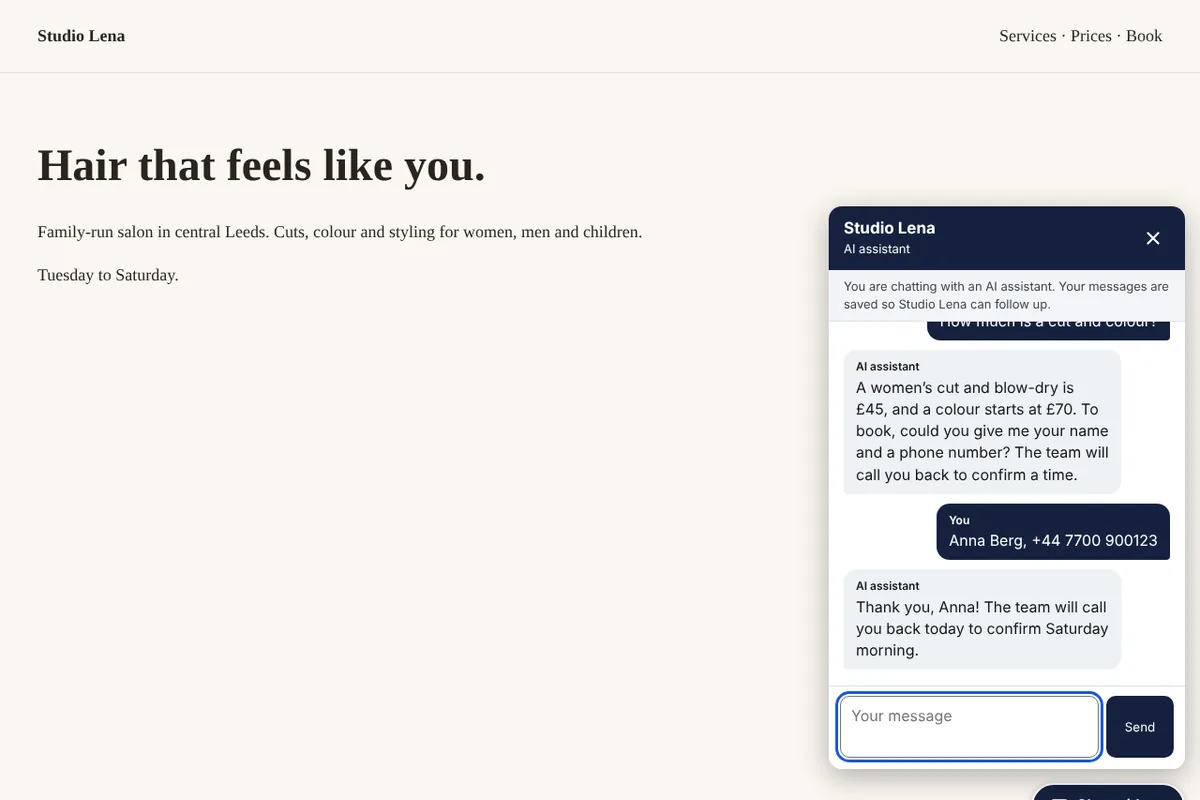
Every unanswered message is a customer who asks someone else
When you are with a client, on a job or closed for the night, the phone rings out and messages wait. Most people who need a haircut, a repair or an appointment do not wait long. They try the next business in the search results.
Hiring someone to answer around the clock costs more than most small businesses can carry, and general chatbots make things up. You need something that answers the simple questions correctly, takes down the details of people who want to book, and hands everything else to you.
How it works
Connect your AI key
Create an API key at OpenAI, Anthropic (Claude) or Google Gemini and paste it under Connections. You top up credit with the provider yourself and set your own spending limit there. Our guide shows each click, with a short video.
Tell it about your business
Fill in a simple form: what you do, opening hours, services and prices, how to book, and answers to the questions customers ask most. The assistant answers only from this and says when it does not know.
Test it with real questions
Ask it what your customers ask. If an answer is missing or wrong, add it to your information and ask again. Test chats are not counted in your plan.
Switch on your channels
Paste one line of code on your website for the chat. On the Pro plan, connect your WhatsApp Business number and a Twilio number to answer WhatsApp and text back missed callers.
Get enquiries by email
When a customer leaves a name and phone number or email, you get an email with what they need and the whole conversation. You can reply yourself at any time and hand the conversation back to the assistant.
What you get
Website chat in one line of code
A clear chat button on your site that opens a chat panel. It works with WordPress, Shopify, Wix, Squarespace, Webflow and any site where you can add code, and it only runs on the websites you list.
Answers in your customer’s language
It replies in the language the customer writes in. You choose the language of the chat buttons and the fallback message: English, German, French, Spanish, Italian, Dutch, Polish, Portuguese or Macedonian.
Only your information, no guessing
It is told to use only what you wrote, never to invent prices, opening times or availability, and not to confirm bookings itself. When it is unsure, it offers to pass the question to you.
Enquiries straight to your inbox
When someone gives a name and a way to contact them, you get an email with their details, a short summary of what they need and the conversation. Requests to talk to a person are flagged too.
Take over at any moment
Open a conversation and reply yourself. The assistant stops answering that conversation until you click “Let the assistant answer again”. On the website, the customer sees your reply in the open chat.
WhatsApp replies (Pro)
Connect your WhatsApp Business number through Meta’s official Cloud API. Messages are answered within seconds, and the first reply says it comes from your AI assistant.
Missed-call text back (Pro)
When you miss a call on your Twilio number, the caller hears a short message and gets a text. If they reply, the assistant carries on the conversation by SMS. Optionally your own phone rings first for 20 seconds.
Your own AI account, no markup
Answers are written with your own OpenAI, Anthropic (Claude) or Google Gemini key. The provider bills you directly at its own prices; we add nothing. A small, fast model is picked for you and you can change it any time.
See exactly what was used
The Usage page shows a daily report, a report for every AI model you use and the tokens each conversation took, so you can compare it with your provider’s bill. Download every AI reply as a CSV file, or get a short report by email every morning.
Limits that protect your budget
A daily cap on AI answers that you set, a limit on messages per conversation and per visitor, and your plan’s monthly conversation allowance. When a limit is reached, customers are asked to leave their contact details instead.
Clear about being an AI
The chat shows that customers are talking to an AI assistant and links to your privacy policy, as the EU AI Act expects from August 2026.
Conversations deleted on your schedule
Choose to delete conversations after 30 days, 90 days, 6 months or a year. Your customers’ messages are never used to train AI models by us.
Who it is for
Salons, barbers and beauty studios
Answers prices and opening hours while you work, and collects names and numbers from people who want an appointment.
Clinics, physios and therapists
Explains services, location and how to book, and passes every request on to reception. Set it up so it does not ask for health details.
Trades and repair shops
Texts back callers you miss while on a job, asks what needs fixing and where, and sends you the details to call back.
Restaurants, cafés and guest houses
Answers questions about the menu, allergens you have listed, parking and opening times, on your website and WhatsApp.
Shops and online stores
Handles questions about delivery, returns and product availability you have described, and hands complaints to you.
Plans and prices
-
Free trial
€0 for 7 days
- Website chat on 1 website
- WhatsApp and missed-call text back
- 50 conversations in total
- Works with your own AI key
- Enquiries sent to your email
-
Starter
€25 per month
- Chat on 1 website
- 500 conversations per month
- Replies in your customer’s language
- New leads sent to your email
- Works with your own OpenAI, Claude or Gemini key
- You pay your AI provider directly, nothing added by us
-
Pro
€49 per month
- Chat on up to 3 websites
- 3,000 conversations per month
- WhatsApp replies
- Text back missed callers (Twilio)
- Works with your own OpenAI, Claude or Gemini key
- You pay your AI provider directly, nothing added by us
Prices exclude VAT or sales tax, which is added at checkout for your country. Plans pay for the tools themselves. Where a tool uses your own AI, Twilio, WhatsApp or email account, that provider bills you directly. Cancel any time.
Questions
Do I need technical skills to set it up?
No. You fill in a form about your business, test it, and paste one line of code in your website builder’s custom-code box. Our guide shows where that box is in WordPress, Shopify, Wix, Squarespace and others. WhatsApp and Twilio take a little longer to connect, and the connections guide walks you through every step.
How much does the AI itself cost?
You connect your own OpenAI, Anthropic (Claude) or Google Gemini key and pay that provider directly for what you use, usually from prepaid credit you top up yourself. We add nothing. A small, fast model keeps the cost per conversation low, and the daily cap you set stops costs from running away. A ChatGPT Plus subscription is not needed and does not include API use.
Which AI provider should I choose?
Any of the three works well. OpenAI and Anthropic are pay-as-you-go with prepaid credit. Google Gemini has a free tier, but on it Google may use what you send to improve its products, and its terms allow only the paid tier for customers in the EU, the UK and Switzerland. Our AI setup guide compares them and shows each step.
Can I see what the AI used?
Yes. The Usage page shows a daily report and a report per AI model, and every conversation page shows the replies and tokens it took. You can download every AI reply as a CSV file or get a daily email report, and compare it with your provider’s bill.
Will it make things up?
It is instructed to answer only from the information you give it, never to invent prices, availability or promises, and to say when it is not sure. No AI is perfect, so test it with your customers’ real questions, keep your information clear and up to date, and read the conversations now and then.
What counts as a conversation?
One conversation is everything a customer writes in one chat session on your website, or in one WhatsApp or SMS thread until there is a day of silence. A conversation is counted once, when the assistant first answers it, however many messages it has, up to 30 messages from the customer. Test chats do not count as conversations.
What happens when I reach a limit?
Instead of an AI answer, the customer gets a polite message asking for their name and phone number or email address, in your chosen language, and you get an email so nobody is lost. Existing conversations can continue within their own limits.
Does it work with WhatsApp?
Yes, on the Pro plan and in the trial. You connect a WhatsApp Business number through Meta’s Cloud API. Meta allows AI assistants that serve a business’s own customers. Replies within 24 hours of a customer’s message are service messages; Meta gives each number a monthly free allowance and bills you directly after that.
Is it allowed under the EU AI Act and GDPR?
The chat tells people they are talking to an AI assistant, which the EU AI Act requires for chatbots from 2 August 2026, and it can link to your privacy policy. You decide how long conversations are kept. We act as your processor under our data processing agreement. You remain responsible for how you use it, so do not use it to collect health or other sensitive data.
Can I use it on more than one website?
The Starter plan covers one website. The Pro plan covers up to three, each with its own assistant, information and look. WhatsApp and missed calls are answered by one assistant you choose.
More answers in the AI receptionist guide.
Try AI receptionist free for 7 days
Every tool is included in the trial. No card needed, cancel any time.