
Payment reminders
Automated payment reminders that get unpaid invoices paid
Add an unpaid invoice once. Payment reminders go out automatically on the days you choose, in your customer’s language and from your own mailbox, and they stop as soon as the invoice is paid.
Try it free with no card, or choose a plan and pay straight away. Read the full guide
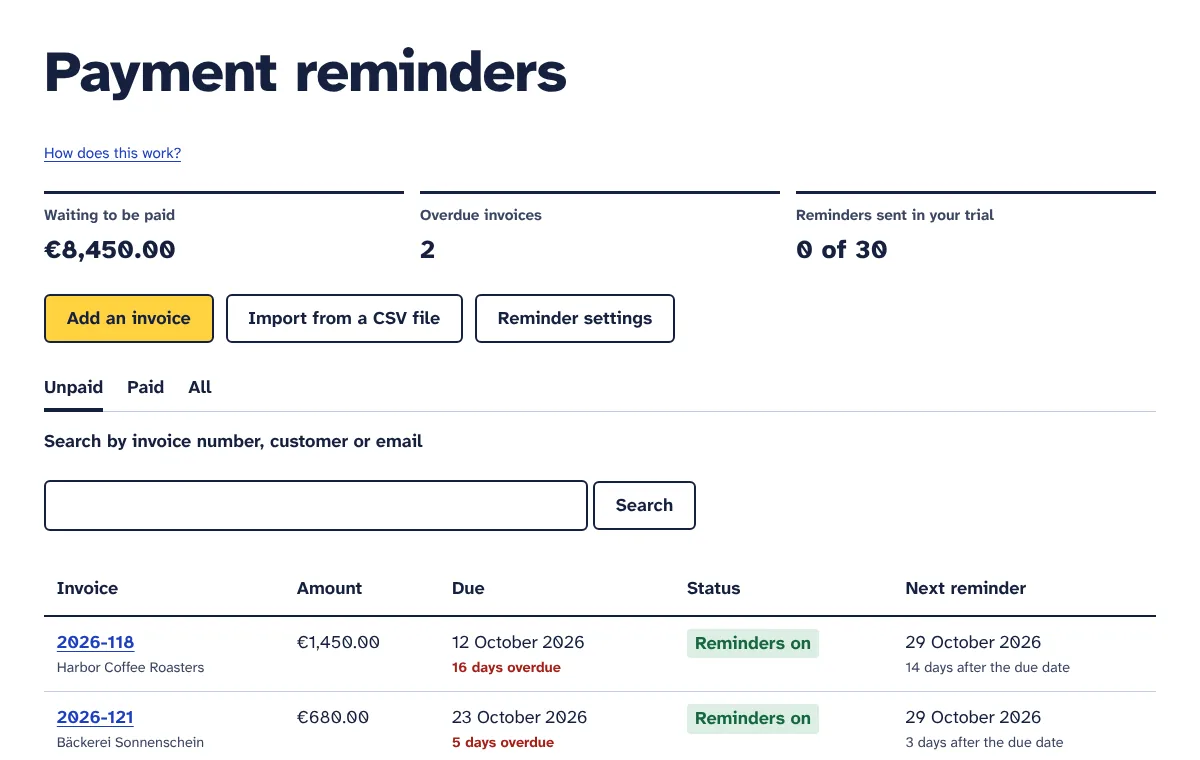
Most late invoices are forgotten, not refused
An overdue invoice is rarely a dispute. It sits in a busy inbox, waits for someone to approve it or simply slips a customer’s mind. A short reminder on the right day is often all it takes, but writing one for every invoice, at the right moment and in the right tone, is the job that keeps getting pushed to next week.
The longer you wait, the more awkward that first email feels. This invoice reminder software does the remembering for you: it sends overdue invoice reminder emails from your own address on a schedule you set, gets a little firmer each time, and stops the moment you or your customer say the invoice is paid.
How it works
Connect your mailbox
Enter the SMTP details of the address you invoice from, such as billing@yourbusiness.com, and send yourself a test email. Reminders go out from that address, so customers recognise you and replies come back to your inbox.
Set your schedule
Choose which reminders to send: 3 days before the due date, on the due date, and 3, 7, 14 or 30 days after it. Pick the hour, your time zone, your default language and the payment details to show.
Add your unpaid invoices
Type one in, import a CSV export from your accounting software or spreadsheet, or send an issued invoice over from our E-invoices tool. Add a payment link and the invoice PDF if you like.
Reminders go out by themselves
Every 15 minutes the tool checks which invoices need a reminder and sends it between your chosen hour and 18:00. Each invoice shows the date and type of its next reminder, and you can preview the exact email first.
They stop when the invoice is paid
Click Mark as paid when the money arrives. If your customer clicks “Already paid” in a reminder, reminders for that invoice pause at once and you get an email so you can check your bank.
What you get
Sent from your own email address
Reminders go out through your own mailbox (SMTP) with your sender name and address, and replies come straight to you. It works with providers that allow SMTP sign-in with a password or app password. Your password is stored encrypted.
Six stages you switch on or off
3 days before the due date, on the due date, then 3, 7, 14 and 30 days after it. Four are on by default: the due date and 3, 7 and 14 days after. The texts get firmer step by step, and the 30-day one is a final reminder.
Polite by design
Each stage is sent once, and an invoice never gets two reminders within 36 hours. An invoice you add when it is already 20 days late gets one reminder, not a pile of catch-up emails, and a first email never calls itself a second or final reminder.
Office hours, in your time zone
Choose a start time between 06:00 and 17:00 and your time zone. Reminders go out between that time and 18:00, never in the evening, and due dates are counted in your time zone, so “due today” means today where you are.
Ready-made texts in 8 languages
English, German, French, Spanish, Italian, Dutch, Polish and Portuguese. Each invoice has its own reminder language, and amounts and dates are written the way that language does, such as 1.250,00 € and 14. Oktober 2026 in German.
Your own wording on the Pro plan
Write your own subject and message for any stage and language, with placeholders for the customer name, invoice number, amount, due date, days overdue and your business name. Included in the free trial; the Starter plan uses the ready-made texts.
A payment link or your payment details
Add a Stripe, PayPal or bank payment link to an invoice and every reminder shows it. Without a link, reminders show the payment details you saved once, such as your IBAN and the reference to use.
The invoice PDF attached
Upload the invoice as a PDF of up to 2 MB and it is attached to every reminder for that invoice, so your customer never has to ask for another copy.
One-click “Already paid”
Every reminder links to a simple page in your customer’s language where they can tell you they have paid, without logging in. Reminders for that invoice pause and you get an email to check your bank.
Import from a CSV file
Upload an export from your accounting software or spreadsheet. Column names in English and seven other languages are recognised, separators, decimal commas and date formats are detected, and you check a preview before anything is imported.
Full control of every invoice
Mark an invoice as paid, pause or resume its reminders, send one by hand, edit or delete it. Preview the next email exactly as your customer will get it on the day it goes out, and see a dated history of every reminder and change.
Overview, search, copies and alerts
See what you are owed in each currency, how many invoices are overdue and how many reminders you have sent. Search by invoice number, customer or email. Get a blind copy of every reminder if you like, and an email if one cannot be sent.
Who it is for
Freelancers and consultants
No more awkward “just checking in” emails. Add each invoice when you send it, and polite reminders follow on and after the due date from your own address while you get on with client work.
Agencies and B2B service firms
Keep track of many open invoices in several currencies, see the total waiting to be paid at a glance, and let a firmer reminder go out after 14 days without anyone having to remember it.
Trades, repairs and installers
Add the invoice in a minute after the job, with a payment link. Customers who have already paid can say so with one click, so you do not chase money that is already in the bank.
Wholesalers and shops selling to businesses
Import open invoices from your accounting export and remind trade customers in their own language, with the invoice PDF attached and your bank details in every email.
Plans and prices
-
Free trial
€0 for 7 days
- Up to 10 unpaid invoices at a time
- 30 reminders in total during the trial
- Ready-made texts in 8 languages, plus your own texts
- Sent from your own email address
- Payment links, PDF attachments and CSV import
- No card needed
-
Starter
€19 per month
- Up to 100 unpaid invoices at a time
- 500 reminders per month
- Ready-made reminders in 8 languages
- Sent from your own email address
- Import invoices from a CSV file
-
Pro
€34 per month
- Up to 1,000 unpaid invoices at a time
- 5,000 reminders per month
- Write your own reminder texts
- Sent from your own email address
- Import invoices from a CSV file
Prices exclude VAT or sales tax, which is added at checkout for your country. Plans pay for the tools themselves. Where a tool uses your own AI, Twilio, WhatsApp or email account, that provider bills you directly. Cancel any time.
Questions
Do the reminders really come from my email address?
Yes. You connect your own mailbox with its SMTP details, and every reminder is sent through it with your sender name and address. Customers see an email from you, not from us, and their replies land in your inbox. Your provider’s normal sending limits apply. You can also have a blind copy of every reminder sent to yourself.
Which email providers work?
Any provider that lets you send by SMTP with a username and a password or app password, which covers most business email, hosting and domain providers. For Gmail, for example, you use smtp.gmail.com, port 587 and an app password. If your provider only allows its own apps to sign in and offers no SMTP password, the connection will not work.
Does the tool know when my customer has paid?
No. It does not connect to your bank or payment provider, so it cannot see payments. You click Mark as paid when the money arrives, and reminders stop. Your customer can also click “Already paid” in any reminder: reminders for that invoice pause and you get an email asking you to check your bank and confirm.
Can I change what the reminders say?
On the Pro plan and during the free trial, yes. You can write your own subject and message for each stage, using placeholders such as {customer}, {invoice}, {amount}, {due_date} and {days}. You write them per language, and invoices in other languages keep the ready-made texts. The greeting, payment details, “Already paid” link and sign-off are added for you. On the Starter plan, the ready-made texts are used.
Does it add late payment interest or fees?
No. Reminders ask for the amount you entered and never add interest or fees by themselves. If your contract or the law lets you charge them, you can mention this in your own reminder texts and send the interest as a separate invoice. Our guide to late payment interest explains the rules in the EU, UK, US and Australia.
What if an invoice is already overdue when I add it?
It gets one reminder in the next sending window: the most recent stage it has reached. An invoice that is 20 days late gets the 14-day reminder, not four emails in a row. If that first email is the 7-day or 30-day one, it is worded as a first notice rather than a second or final reminder. You can preview it on the invoice page first.
Can I import invoices from my accounting software?
Yes, from any software that exports a CSV file, or from a spreadsheet. You need columns for the invoice number, customer name, customer email, amount still to pay and due date; currency, invoice date, payment link and language are optional. You see a preview with any problems before importing. There is no direct connection to accounting software.
Will my customers get too many emails?
You choose which stages to use, each stage is sent only once, and an invoice never gets two reminders within 36 hours. The default is four reminders: on the due date and 3, 7 and 14 days after it. Reminders stop when you mark the invoice as paid, pause it, or your customer says they have paid.
What happens when I reach my limit or the trial ends?
When the month’s reminders are used up, due reminders wait and the invoice history says so; they go out when your allowance renews or after you upgrade. When the trial ends without a plan, no reminders go out and you cannot add invoices, but your invoices, settings and history stay and you can still mark invoices as paid.
More answers in the Payment reminders guide.
Try Payment reminders free for 7 days
Every tool is included in the trial. No card needed, cancel any time.